Smart Tags
You can customize your PostGraphile GraphQL schema by tagging tables, columns, functions, relations, etc. These changes could be renaming something, omitting things from your GraphQL schema, or anything else a plugin supports!
你可以为表、列、函数、relation 等数据库对象添加标签,从而定制 PostGraphile 生成的 GraphQL schema。定制内容包括重命名对象、从 GraphQL schema 中隐藏特定成员,以及插件所支持的各类其他调整!
We call this functionality "Smart Tags" and it allows you to easily customise the generated GraphQL schema without making breaking changes to your database.
我们将这一功能称为“Smart Tags”(智能标签)。借助它,无需对数据库本身做破坏性变更,即可轻松定制生成的 GraphQL schema。
If you're using PostGraphile in --watch mode, you should be able to see in
Ruru that the related types and fields will reflect the change almost
immediately. If you're not using --watch then you may need to restart the
server for smart tag changes to take effect.
如果 PostGraphile 运行在 --watch 模式下,smart tag 的修改几乎会立即同步到 Ruru 中,你可以直接看到相关类型和字段的变化;如果未开启 --watch,则可能需要重启服务才能让修改生效。
The @ character@ 字符
We often refer to things like the @behavior smart tag or the @name smart
tag; really these tags are just behavior and name respectively; but in the
Smart Comment syntax (the oldest form of smart tags in
PostGraphile) the @ is required to denote a smart tag, and this pattern has
stuck when referring to smart tags.
在日常讨论中,我们常把它们称为 @behavior smart tag 或 @name smart tag。严格来说,这些标签本身的名称只是 behavior 和 name;不过在 smart comment 语法(PostGraphile 中最早引入 smart tag 的写法)中,必须使用 @ 来标识这是一个 smart tag,这一命名习惯也就沿用至今。
You will also often see the smart comment
syntax used to refer to smart tags in
general, it's because the syntax is a little easier to write quickly. Read the
Smart Comments Spec and you'll soon
learn to translate @omit update,delete to omit: "update,delete" (and
vice-versa) in your head.
平时你也经常会看到人们直接用 smart comment 语法来代指 smart tag,因为这种写法更简短顺手。读完 Smart Comments 规范 后,你很快就能在脑海里自如地把 @omit update,delete 和 omit: "update,delete" 互相转换。
Valid values有效取值
Tags have a limited set of valid values:
标签的有效取值类型有限,仅支持以下几种:
true-
a string
字符串
-
an array of strings
字符串数组
Some tags only support one or two of these types of values.
部分标签仅支持其中的一种或两种取值类型。
Ways of adding tags添加标签的方式
There's multiple ways of adding tags to entities:
你可以通过多种方式为实体添加标签:
-
The postgraphile.tags.json5 file
通过 postgraphile.tags.json5 文件
-
Smart Comments in the database via
COMMENT在数据库中通过
COMMENT编写 smart comments -
A
pgSmartTagsinstance使用
pgSmartTags实例 -
-
implement the
gather.hooks.pgIntrospection_introspectioncallback,实现
gather.hooks.pgIntrospection_introspection回调; -
get the relevant entity,
获取目标实体;
-
call
entity.getTagsAndDescription()on it,在该实体上调用
entity.getTagsAndDescription(); -
mutate the resulting
.tagsproperty of the returned object.修改返回对象的
.tags属性。
-
Example示例
In this example we're going to use Smart Comments for brevity, but this works with all the ways of adding smart tags.
为简洁起见,本例采用 smart comment 写法,但所有添加 smart tag 的方式都适用相同的效果。
Here is a basic table, with the name changed from original_table to
renamed_table:
下面是一张基础数据表,我们将其名称从 original_table 改为 renamed_table:
create table original_table (
  col1 int
);

comment on table original_table is E'@name renamed_table';
The column can also be renamed:
列同样可以重命名:
comment on column original_table.col1 is E'@name colA';
The same can be done for types and custom queries:
这一做法同样适用于自定义类型和自定义 Query:
create type flibble as (f text);

create function getFlamble() returns SETOF flibble as $$
    select (body)::flibble from post
$$ language sql;

comment on type flibble is E'@name flamble';
comment on function getFlamble() is E'@name allFlambles';
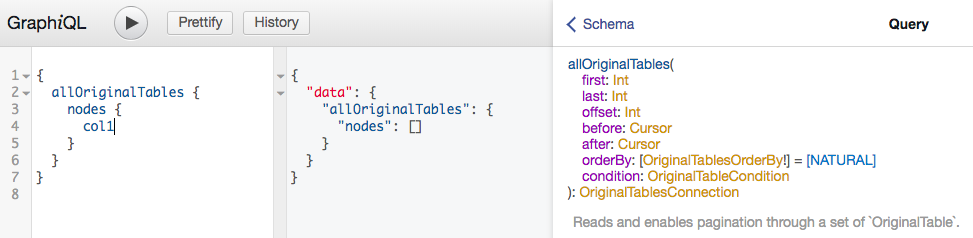
Smart comments are also reflected in GraphiQL. Here, we are querying the table
original_table by looking at allOriginalTables:
smart comment 的效果也会实时体现在 GraphiQL 中。下面我们先通过 allOriginalTables 查询 original_table 表:
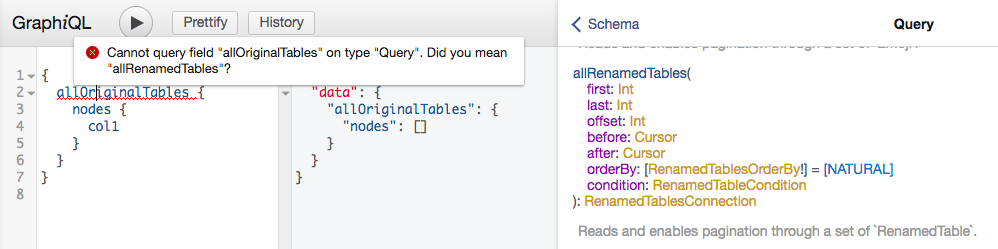
Next, we add the smart comment @name renamed_table on original_table and the
rename is instantly reflected in GraphiQL:
接着,我们在 original_table 上添加 @name renamed_table smart comment,GraphiQL 中会立即体现出这一重命名:
So now the query needs to use the new name for the table:
此时查询就需要使用该表的新名称了:
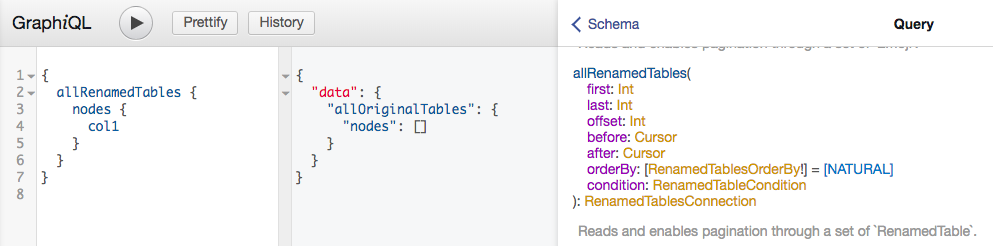
These screenshots were taken in an early PostGraphile V4 GraphiQL. Though Ruru in PostGraphile V5 will look different, the results are the same.
以上截图源自早期 PostGraphile V4 的 GraphiQL 界面。PostGraphile V5 中的 Ruru 界面虽有所不同,但最终效果完全一致。
Non-exhaustive非完整列表
Any plugin may implement support for smart tags, so refer to those plugins' documentation for details of the smart tags they add.
任何插件都可以实现自己的 smart tag,因此具体标签的用法请以对应插件的文档为准。
The following are some of the smart tags built into PostGraphile:
以下列出了 PostGraphile 内置的部分常用 smart tag:
@deprecated@deprecated
You can deprecate a database column using the deprecated tag. If you need
multiple lines, you can specify the tag multiple times, one per line of output
text.
你可以使用 deprecated 标签将数据库列标记为已弃用。如果弃用说明需要多行文本,可以多次指定该标签,每次对应输出文本中的一行。
Applies to:
适用对象:
-
columns
列
{
  version: 1,
  config: {
    attribute: {
      my_column: {
        tags: {
          deprecated: "Use myOtherColumn instead.",
        },
      },
    },
  },
}
comment on column my_schema.my_table.my_column is
  E'@deprecated Use myOtherColumn instead.';
@name@name
You can add a smart tag to an entity to rename that entity. For tables, columns,
custom types and many functions you can use the name tag. For more complex
things we use different tags, such as for foreign key constraints we have
fieldName and foreignFieldName.
你可以为实体添加 smart tag 来对其进行重命名。对于表、列、自定义类型以及多数函数,使用 name 标签即可;而对于更复杂的场景则会用到专门的标签,例如外键约束使用的是 fieldName 和 foreignFieldName。
Applies to:
适用对象:
-
Tables
表
-
Views
视图
-
Materialized views
物化视图
-
Composite types (one direction only)
复合类型(仅单向)
-
Columns
列
-
Types
类型
-
Custom Query functions: the
Queryfield name自定义 Query 函数:对应
Query上的字段名 -
Custom Mutation functions: the
Mutationfield name自定义 Mutation 函数:对应
Mutation上的字段名
{
  version: 1,
  config: {
    class: {
      post: {
        tags: {
          name: "message",
        },
      },
    },
    procedure: {
      search_posts: {
        tags: {
          name: "returnPostsMatching",
        },
      },
    },
  },
}
comment on table post is
  E'@name message';
comment on function search_posts(text) is
  E'@name returnPostsMatching';
@fieldName@fieldName
Applies to:
适用对象:
-
foreign key constraints: the local field name for the relationship (see also
@foreignFieldName)外键约束:当前类型上的关联字段名(另请参阅
@foreignFieldName) -
unique constraints: the root finder field name
唯一约束:对应根级查询(root finder)字段的名称
-
computed column functions: the field name this function creates
计算列函数:该函数所生成字段的名称
@foreignFieldName@foreignFieldName
foreignFieldName applies to
foreignFieldName 适用于:
-
foreign key constraints: the field on the remote type (the "backwards" relation)
外键约束:远端类型上的字段名(即“反向” relation)
{
  version: 1,
  config: {
    constraint: {
      "my_table.my_constraint": {
        tags: {
          foreignFieldName: "threads",
          fieldName: "author",
        },
      },
    },
  },
}
This name will be fed through the connectionField (by default does nothing)
or listField (by default appends 'List') inflector as appropriate. To
specifically override the name of the connection field, use
@foreignConnectionFieldName; and to specifically override the name of the
list field, use @foreignSimpleFieldName.
该名称随后会根据情况经由 connectionField(默认不做修改)或 listField(默认追加 'List' 后缀)inflector 进行转换。若想单独覆盖 Connection 字段的名称,请使用 @foreignConnectionFieldName;若想单独覆盖列表字段的名称,请使用 @foreignSimpleFieldName。
See also: @fieldName, @foreignSimpleFieldName, @foreignConnectionFieldName
另请参阅:@fieldName、@foreignSimpleFieldName、@foreignConnectionFieldName
@foreignSimpleFieldName@foreignSimpleFieldName
foreignSimpleFieldName applies to list fields generated from
foreignSimpleFieldName 适用于由以下对象生成的列表字段:
-
foreign key constraints: the field on the remote type (the "backwards" relation)
外键约束:远端类型上的字段(即“反向” relation)
@foreignConnectionFieldName@foreignConnectionFieldName
foreignConnectionFieldName applies to connection fields generated from
foreignConnectionFieldName 适用于由以下对象生成的 Connection 字段:
-
foreign key constraints: the field on the remote type (the "backwards" relation)
外键约束:远端类型上的字段(即“反向” relation)
@returnType@returnType
Applies to:
适用对象:
-
Custom Query functions
自定义 Query 函数
-
Custom Mutation functions
自定义 Mutation 函数
-
Computed Column functions
计算列函数
Details the named GraphQL type to use to represent the result of the function (this may then be wrapped in a list or connection or non-null or similar, if the function demands it). This type must be compatible with the derived type; currently this means that if the function returns a polymorphic type then the named type must either be the polymorphic type itself, or one of its implementations.
用于指定函数返回值所对应的具名 GraphQL 类型(若函数签名需要,该类型随后仍可能会被包装为列表、Connection 或非空等形式)。所指定的类型必须与自动推导出的类型兼容;以当前实现而言,若函数返回多态类型,则此具名类型必须是该多态类型本身,或其具体实现类型之一。
We trust that you will ensure that results from the function conform to the type specified; if you break this then Weird Things may occur.
你需要自行确保函数的实际返回值符合所指定的类型;一旦违背这一点,就可能出现各种诡异的问题。
@resultFieldName@resultFieldName
Applies to:
适用对象:
-
Custom Mutation functions: the field on the mutation payload type
自定义 Mutation 函数:变更 payload 类型上的字段名
{
  version: 1,
  config: {
    procedure: {
      authenticate: {
        tags: {
          name: "login",
          resultFieldName: "token",
        },
      },
    },
  },
}
comment on function authenticate(text, text) is
  E'@resultFieldName token\n@name login';
@behavior@behavior
Use this smart tag to override the behavior associated with a table, view, materialized view, type, column, constraint, function or other database entity. See the behavior documentation.
使用该 smart tag 可覆盖表、视图、物化视图、类型、列、约束、函数或其他数据库实体所关联的 behavior。详情请参阅 behavior 文档。
comment on table users is
  E'@behavior -insert -delete';
@arg0variant, @arg1variant, ...@arg0variant, @arg1variant, ...
When building a custom mutation, you probably want to use the composite type that is generated when creating a table in PostgreSQL as a function argument, like this (note this is just an example for illustrative purposes):
在编写自定义 mutation 时,你可能会希望直接把在 PostgreSQL 中创建表时自动生成的复合类型作为函数参数,如下所示(注意这仅用于演示说明):
create table example(
  id uuid primary key,
  name text not null
);

create function new_example(input example) returns example as $$
  insert into example (id, name) values (input.id, input.name) returning *;
$$ language sql volatile;
By default, composite types will be translated into a GraphQL types by
PostGraphile with the same characteristics, i.e. all not null columns will
become non-nullable fields. You can let PostGraphile know that you want to
convert the composite type into another "variant" GraphQL type with a smart
comment. Variants include patch (which is equivalent to the argument to
update* mutations), nodeId (which can be used to have a function to accept
the type's global object identifier) and base (which
makes every column both available (ignores permissions) and nullable). For
example:
默认情况下,PostGraphile 会按原样将复合类型映射为 GraphQL 类型,也就是说,所有 not null 列都会成为非空字段。你可以通过 smart comment 告知 PostGraphile 将该复合类型转换为另一种“变体(variant)”GraphQL 类型。可用变体包括:patch(等价于 update* mutation 的参数类型)、nodeId(使函数接收该类型的全局对象标识符)以及 base(使所有列均可用——忽略权限限制——且均为可空)。例如:
create table example(
  id uuid primary key,
  name text not null
);

create function new_example_with_auto_id(input example) returns example as $$
  insert into example (id, name) values (gen_random_uuid(), input.name) returning *;
$$ language sql volatile;

comment on function new_example_with_auto_id(input example) is
  E'@arg0variant patch';
This uses the patch variant from PostGraphile's update mutations which has all
the fields except id. This will mean that the custom mutation will not ask for
the id on the client-side anymore (because it will generate it itself). Note
how arg0 refers to the first function parameter (we use a 0-indexed counter of
the arguments), thus arg2 would be the third parameter.
上例采用了 PostGraphile 更新 mutation 中的 patch 变体,其中包含除 id 之外的所有字段。这意味着客户端在调用该自定义 mutation 时无需再传入 id(因为服务端会自行生成)。注意,arg0 指代函数的第一个参数(参数编号从 0 开始),因此 arg2 对应的便是第三个参数。
Applies to:
适用对象:
-
Custom Query functions
自定义 Query 函数
-
Custom Mutation functions
自定义 Mutation 函数
-
Computed Column functions
计算列函数
@ref@ref
@refVia@refVia
Virtual constraints虚拟约束
You can add "virtual" (fake) constraints to types in PostgreSQL using smart comments. The primary use case for this is to make views act more table-like - allowing you to express the connections between tables and views. It's also useful on composite types, especially for adding relationships.
你可以利用 smart comment 为 PostgreSQL 中的类型添加“虚拟”(伪)约束。这一特性主要用于让视图表现得更像数据表——从而表达表与视图之间的关联关系;它同样适用于复合类型,尤其是在为其添加关联关系时非常有用。
@notNull@notNull
Allows marking the column as non-nullable.
用于将列标记为非空(non-nullable)。
Applies to:
适用对象:
-
columns
列
{
  version: 1,
  config: {
    attribute: {
      "my_view.my_column": {
        tags: {
          notNull: true,
        },
      },
    },
  },
}
comment on column my_view.my_column is E'@notNull`;
@primaryKey@primaryKey
Primary key columns will automatically be marked as @notNull, as they would in
PostgreSQL.
与 PostgreSQL 中的行为一致,主键列会自动被标记为 @notNull。
If you declare something as a primary key it must be unique. We do not check it's unique — we trust you — but if it isn't unique then we're not sure what will happen...
如果你将某个字段或字段组合声明为主键,它就必须具备唯一性。PostGraphile 不会去校验它是否真的唯一——我们选择相信你的声明;但如果数据实际上不唯一,后续行为将无法预料……
{
  version: 1,
  config: {
    class: {
      my_view: {
        tags: {
          primaryKey: "id",
          // or:
          //   primaryKey: "type,identifier"
        },
      },
    },
  },
}
comment on view my_view is E'@primaryKey id';
-- or
comment on view my_view is E'@primaryKey type,identifier';
@foreignKey@foreignKey
The foreign key adds virtual constraints that behave like foreign keys. It has the following syntax which mirrors the PostgreSQL foreign key constraint:
@foreignKey 标签用于添加表现如同真实外键的虚拟约束,其语法与 PostgreSQL 的外键约束如出一辙:
@foreignKey (col1, ...) references [my_schema.]my_table [(col1, ...)]
In the tags file you must omit the leading @foreignKey text since it is
specified as the key (rather than the value) in the tags object ─ see example
below.
在 tags 文件中配置时,必须省略开头的 @foreignKey 字样,因为它在 tags 对象中是作为键(而非值)来指定的——参见下方示例。
The schema is optional if the target table is in the same schema. If you're referencing a Primary Key on the remote table/view then you can skip the final column specification should you wish. Otherwise, you must reference columns matching a unique constraint.
如果目标表位于同一个数据库 schema 中,则可以省略 schema 名称。若引用的是远端表或视图的主键,末尾的列名列表也可省略;否则,所引用的列必须对应一个唯一约束。
Applies to:
适用对象:
-
Tables
表
-
Views
视图
-
Materialized views
物化视图
-
Composite types (one direction only)
复合类型(仅单向)
{
  version: 1,
  config: {
    class: {
      my_materialized_view: {
        tags: {
          foreignKey: "(key_1, key_2) references other_table (key_1, key_2)",
        },
      },
    },
  },
}
{
  version: 1,
  config: {
    class: {
      my_materialized_view: {
        tags: {
          foreignKey: [
            "(key_1, key_2) references other_table (key_1, key_2)",
            "(key_3, key_4) references some_other_table (key_3, key_4)",
          ],
        },
      },
    },
  },
}
comment on materialized view my_materialized_view is E'@foreignKey (key_1, key_2) references other_table (key_1, key_2)';

-- or if you want multiple foreignKeys
comment on materialized view my_materialized_view is E'@foreignKey (key_1, key_2) references other_table (key_1, key_2)\n@foreignKey (key_3, key_4) references some_other_table (key_3, key_4)';
Fake constraints are treated as if they are indexed.
虚拟约束会被视作已建立索引。
@unique@unique
From PostGraphile 4.9.1
自 PostGraphile 4.9.1 起支持
Introduces a "fake" unique constraint, so @unique col1,col2 is somewhat
equivalent to the following, except it can also be applied to entities that
cannot have unique constraints, e.g. views. It is up to you to ensure that your
data is indeed unique on the given columns.
用于引入一个“虚拟”唯一约束,因此 @unique col1,col2 的效果大致相当于下面这条 SQL 语句,只不过它还能用于视图这类原生无法创建唯一约束的实体。你需要自行保证数据在指定列上确实唯一。
-- `@unique col1,col2` is roughly equivalent to:
ALTER TABLE foo ADD CONSTRAINT fake_unique UNIQUE (col1, col2);
More than one @unique tag may be specified.
可以同时指定多个 @unique 标签。
{
  version: 1,
  config: {
    class: {
      my_view: {
        tags: {
          unique: ["id", "org_id,slug"],
          // or:
          //   unique: "id"
        },
      },
    },
  },
}
comment on view my_view is E'@unique id\n@unique org,slug';
Smart Tags on virtual constraints为虚拟约束添加 Smart Tags
You can also add smart tags on virtual constraints, for example adding the
fieldName smart tag to a virtual foreign key constraint, by appending the pipe
character | followed by the @-prefixed smart tag:
你还可以为虚拟约束本身继续附加 smart tag(例如为虚拟外键约束加上 fieldName smart tag),只需在末尾追加竖线符 |,再跟上带 @ 前缀的 smart tag 即可:
{
  version: 1,
  config: {
    class: {
      my_materialized_view: {
        tags: {
          foreignKey: "(key_1, key_2) references other_table (key_1, key_2)|@fieldName field_1",
        },
      },
    },
  },
}
Polymorphism多态(Polymorphism)
@interface@interface
See Polymorphism
请参阅多态
@type@type
See Polymorphism
请参阅多态
@unionMember@unionMember
See Polymorphism
请参阅多态
@partitionExpose@partitionExpose
By default, if you're using table partitioning, PostGraphile will only expose
the root partitioned table. You may change this globally with the
preset.schema.pgDefaultPartitionedTableExpose option, or on a per-table basis
using the @partitionExpose smart tag:
在使用表分区(table partitioning)时,PostGraphile 默认只会暴露根分区表。你可以通过 preset.schema.pgDefaultPartitionedTableExpose 选项进行全局调整,或使用 @partitionExpose smart tag 按单张表单独配置:
-
@partitionExpose parent- only expose the parent (partitioned) table, not the children (partitions)@partitionExpose parent—— 仅暴露父(分区)表,不暴露子表(各分区) -
@partitionExpose child- only expose the children (partitions), not the parent partitioned table@partitionExpose child—— 仅暴露子表(各分区),不暴露父分区表 -
@partitionExpose both- expose both the parent (partitioned) table and all of its partitions@partitionExpose both—— 同时暴露父(分区)表及其所有分区
Deprecated tags已弃用的标签
These tags are only available if you're using the V4 preset, and have been replaced by better methods.
以下标签仅在使用 V4 preset 时可用,它们现已被更完善的机制所取代。
@omit@omit
Deprecated: use @behavior -* instead.
已弃用:请改用 @behavior -*。
To remove an entity from your API, you can use the 'omit' smart tag. If you only
want to omit the entity from certain operations you can list them. For example,
@omit update on a table would prevent the table from having an update-related
functionality whilst still including queries, create and delete. @omit update
on a column would prevent the column appearing in the Patch type, so it cannot
be updated (but can still be created) via GraphQL.
若要从 API 中移除某个实体,可以使用 'omit' smart tag。如果只想在特定操作中排除该实体,可以显式列出操作名称。例如,在表上添加 @omit update 会禁用该表的更新相关功能,同时仍保留查询、创建和删除功能;在列上添加 @omit update 则会阻止该列出现在 Patch 类型中,使其无法通过 GraphQL 更新(但仍可在创建时传入)。
Here's a quick-reference for the operations we currently support (you'll want to experiment with them as there wasn't space to put all the caveats in the table!):
以下是当前支持的操作速查表(表中篇幅有限,未能列出所有细节与注意事项,建议结合实际测试加以验证):
| | Action操作 | Table effect对表的影响 | Column effect对列的影响 | Function effect对函数的影响 |
|---|---|---|---|---|
| C | create | omit create mutation省略 create mutation | omit from create从 create 中省略 | - |
| R | read | omit completely完全省略 | completely omitted完全省略 | - |
| U | update | omit update mutations省略 update mutation | omit from update从 update 中省略 | - |
| D | delete | omit delete mutations省略 delete mutation | - | - |
| F | filter | omit condition arg省略 condition 参数 | omit from condition从 condition 中省略 | no filtering禁用过滤 |
| O | order | omit orderBy arg省略 orderBy 参数 | omit from orderBy从 orderBy 中省略 | no ordering禁用排序 |
| A | all | no allFoos query不生成 allFoos 查询 | - | - |
| M | many | no foreign key fields不生成外键字段 | - | - |
| X | execute | - | - | function not present不暴露该函数 |
This functionality is not intended for implementing permissions, it's for removing things from your API that you don't need. You should back these up with database permissions if needed.
该功能并非用于权限控制,它的定位是帮你在 API 中精简不需要的内容。如有安全控制需求,务必在数据库层面配置相应的权限加以保障。
Multiple actions can be listed using commas (no spaces!), as in the following example which disables mutations on a table:
可以使用英文逗号分隔多个操作(注意不要包含空格!),例如下面这段配置用于禁用某张表的所有 mutation:
{
  version: 1,
  config: {
    class: {
      table_name: {
        tags: {
          omit: "create,update,delete",
        },
      },
    },
  },
}
comment on table table_name is E'@omit create,update,delete';
Applies to:
适用对象:
-
Tables
表
-
Views
视图
-
Materialized views
物化视图
-
Composite types (one direction only)
复合类型(仅单向)
-
Columns
列
-
Custom Queries
自定义 Query
-
Custom Mutations
自定义 Mutation
-
Computed Columns
计算列
-
Unique constraints
唯一约束
-
Foreign key constraints
外键约束
Example示例
On a simple table called book we have added a smart comment omitting the
update and delete operations:
在一张名为 book 的简单数据表上,我们添加了 smart comment 来省略 update 和 delete 操作:
create table forum_example.book (
  col1 int
);

comment on table forum_example.book is E'@omit update,delete';
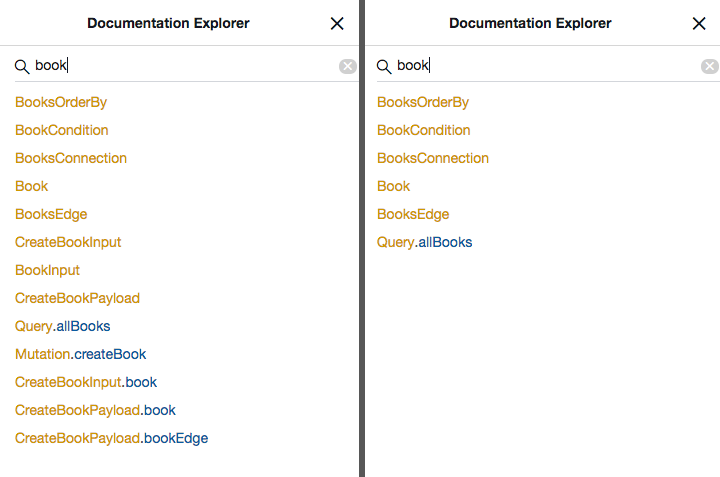
The results are immediately reflected in GraphiQL. We can also disable create
operations:
修改效果会立即反映在 GraphiQL 中。我们还可以进一步禁用 create 操作:
comment on table forum_example.book is E'@omit create,update,delete';
On the left, you can see the documentation for all the fields and types
regarding book before the create operation was omitted. On the right, you
can see the reduced fields and types once the create operation is omitted.
左侧显示的是省略 create 操作之前关于 book 的全部字段与类型文档;右侧则显示了省略 create 操作之后精简下来的字段与类型。
@simpleCollections@simpleCollections
Deprecated: use @behavior +list +connection instead, replacing + with -
for the features to disable.
已弃用:请改用 @behavior +list +connection(若需禁用对应特性,将 + 替换为 - 即可)。
You can control whether simple collections are enabled by default using
--simple-collections omit|both|only (or
simpleCollections: "omit"|"both"|"only"); however sometimes you want to
override this on a case by case setting — for example if you want relay
connections for almost all collections, except when it comes to a user's email
addresses where you want to use a simple list.
你可以通过 --simple-collections omit|both|only(或 simpleCollections: "omit"|"both"|"only")配置项来控制默认是否启用简单列表(simple collections)。不过有时你可能希望针对个别情况覆盖全局设置——例如几乎所有集合都使用 Relay Connection,唯独用户的邮箱列表只想暴露为普通列表。
You can do this with the @simpleCollections omit, @simpleCollections both
and @simpleCollections only smart comments.
这可以通过 @simpleCollections omit、@simpleCollections both 和 @simpleCollections only 这几个 smart comment 来实现。
Applies to:
适用对象:
-
Tables
表
-
Views
视图
-
Materialized views
物化视图
-
Custom Query functions
自定义 Query 函数
-
Computed Column functions
计算列函数
comment on table email is
  E'@simpleCollections both';
comment on constraint email_user_id_fkey on email is
  E'@simpleCollections both';
comment on function search_people(query text) is
  E'@simpleCollections both';
@sortable@sortable
Deprecated: use @behavior +sort +sortBy instead.
已弃用:请改用 @behavior +sort +sortBy。
Applies to:
适用对象:
-
Functions returning
SETOFa table-like composite type (e.g. a table type, view, materialized view, etc, but not a custom type): adds theorderByargument to this connection, allowing to sort the set by its columns/attributes.返回类表复合类型
SETOF的函数(例如表类型、视图、物化视图等,但不适用于自定义复合类型):为对应的 Connection 添加orderBy参数,从而支持按该集合的列或属性进行排序。 -
Computed column functions with no required parameters and returning a scalar or array: allows this function to be used as an order in the
orderByargument for the parent table, allowing to sort the parent table by this function's return value. parent table.无必填参数且返回标量或数组的计算列函数:允许将该函数作为父表
orderBy参数中的一个排序项,从而按该函数的返回值对父表进行排序。
If used on a computed function that returns a SETOF record type it will make
the connection sortable (like it would with any other SETOF function) and
NOT a sort by for its parent table
如果将其用在返回 SETOF 记录类型 的计算列函数上,只会使该 Connection 本身变得可排序(sortable)(与普通 SETOF 函数一致),而不会使其成为父表的排序依据(sort by)。
comment on function foo() is E'@sortable';
comment on function users_foo(users) is E'@sortable';
{
  # If the function returns a set of table rows
  foo(orderBy: [ID_ASC]) { ... }
  user(nodeId: ...) {
    foo(orderBy: [ID_ASC]) { ... }
  }

  # If the function return a scalar
  allUsers(orderBy: [FOO_ASC]) { ... }
}
@filterable@filterable
Deprecated: use @behavior +filter +filterBy instead.
已弃用:请改用 @behavior +filter +filterBy。
Applies to:
适用对象:
-
Functions returning
SETOFa table-like composite type (e.g. a table type, view, materialized view, etc, but not a custom type): adds theconditionargument to this connection, allowing to filter the set by any of its scalar fields.返回类表复合类型
SETOF的函数(例如表类型、视图、物化视图等,但不适用于自定义复合类型):为对应的 Connection 添加condition参数,从而支持按该集合中的任意标量字段进行过滤。 -
Computed column functions with no required parameters and returning a scalar or array: allows this function to be used as field in the
conditionargument for the parent table, allowing to filter by this function's value the parent table.无必填参数且返回标量或数组的计算列函数:允许将该函数作为父表
condition参数中的一个过滤字段,从而按该函数的返回值对父表进行过滤。
If used on a computed function that returns a SETOF record type it will make
the connection filterable (like it would with any other SETOF function) and
NOT a filter by for its parent table
如果将其用在返回 SETOF 记录类型 的计算列函数上,只会使该 Connection 本身变得可过滤(filterable)(与普通 SETOF 函数一致),而不会使其成为父表的过滤条件(filter by)。
comment on function foo() is E'@filterable';
comment on function users_foo(users) is E'@filterable';
{
  # If the function returns a set of table rows
  foo(condition: {firstName: "Alice"}) { ... }

  # If the function return a scalar
  allUsers(condition: {foo: "FOO_VALUE"}) { ... }
}
Sorting and filtering non-scalar computed columns对非标量计算列进行排序与过滤
If your computed column is returning a composite type, the recommended approach is to wrap it with a computed column that returns the scalar field you want to sort and/or filter by. For example:
如果你的计算列返回的是复合类型,推荐做法是用另一个计算列对其进行封装,只返回你希望用来排序或过滤的标量字段。例如:
-- non scalar function
create or replace function user_object(user user) returns object as $$
select * from object where id = user.object_id;
$$ language sql stable;

-- wrapper. Note the () for notation. Failing to use them will throw an error
create or replace function user_object_field(user user) returns varchar as $$
select (user_object(user)).field;
$$ language sql stable;

-- don't forget the comments...
comment on function user_object_field() is E'@sortable';
Note that this will only work with a single composite type. If your computed
function returns a SETOF composite type one option is to use an ARRAY and
the
connection-filter plugin.
注意,上述方法仅适用于返回单个复合类型的计算列。如果你的计算函数返回的是 SETOF 复合类型,一种可行方案是将其聚合为 ARRAY,并搭配 connection-filter 插件使用。
-- non scalar setof function
create or replace function user_objects(user user) returns setof object as $$
select * from object where owner_id = user.id; -- one user, many objects
$$ language sql stable;

-- wrapper. Note the () for notation. Failing to use them will throw an error
create or replace function user_object_fields(user user) returns varchar[] as $$
select array_agg((user_objects(user)).field);
$$ language sql stable;

-- don't forget the comments...
comment on function user_object_fields() is E'@sortable';
Now you can use the array as a filter by, for example:
现在就可以将该数组字段作为过滤条件(filter by)使用了,例如:
{
  # get all users who own an object with field == 'foo'
  allUsers(filter: { object_fields: { contains: "foo" } }) {
    nodes {
      id
      # ...
    }
  }
}